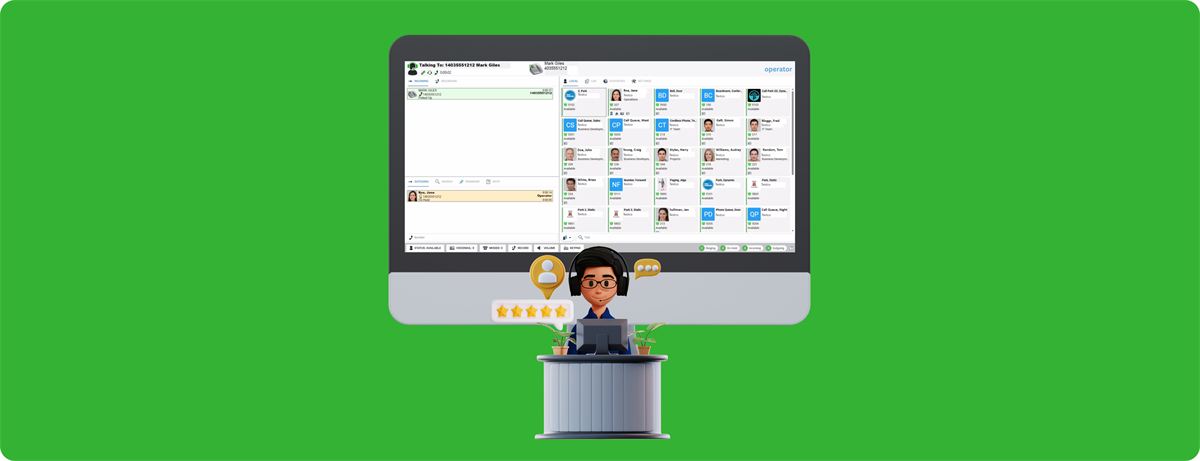
We know at RBI Cloud Connect how much pressure receptionists and professional call operators deal with every day. UC Operator was built to take on those challenges head-on, giving your team what it needs to streamline workflows, give callers a better experience and keep communication at a high standard. It runs in any browser window, on a regular monitor or a touchscreen, and it is designed specifically for busy, high-volume call environments where efficiency and reliability count most.
Below are four problems that call handling teams often run into, along with practical ways to solve them.
1. Handling Many Calls at Once Without Burning Out Staff
Reception desks often get hit with waves of calls, whether during regular business hours, seasonal rushes or promotions. When volume spikes, callers wait longer on hold, opportunities slip away and staff get stressed. In the end, caller satisfaction and your organization's reputation both take a hit.
How UC Operator helps: its drag-and-drop screen uses colour-coded priority indicators (red, orange and green) so your reception team can take on more calls at peak times without stress or mistakes. That means shorter holds, better service, fewer abandoned calls protecting your revenue, no more lost opportunities, and a consistently professional experience even on your busiest days.
2. Sending Blind Transfers to People Who Can't Answer
Transferring calls when you can't see whether a colleague is free frustrates callers and staff alike. A blind transfer to a busy extension leads to callbacks, makes callers repeat themselves and shakes their confidence in how well your organization runs.
How UC Operator helps: one panel on a single screen shows each extension's live status with colour codes: green for available, yellow for ringing, orange for busy and red for do-not-disturb. There's no guessing and no jumping between apps, so receptionists can route each call with full knowledge. Your team resolves more issues on the first call, callers get help right away without repeating their story, and staff spend their time fixing problems rather than apologizing for bad transfers. Fewer callbacks save time and money and strengthen your professional reputation.
3. Measuring Call Performance Without Good Data
When calls are constant and operations are complex, it's hard to spot performance trends, busy periods or where training is needed. Without detailed analytics, managers can't plan staffing well, reward strong work or fix inefficiencies in a consistent way.
How UC Operator helps: a statistics dashboard gives you detailed call analytics that you can filter by date and by operator. Decisions are based on actual performance data instead of expensive assumptions. You can staff with confidence instead of guessing, lower labour costs, spot your top performers, give focused coaching, and improve both profitability and service during peak times.
4. Juggling Contacts Spread Across Different Systems
Keeping contact details up to date in Outlook, CRM systems, company directories and department lists takes constant syncing and leaves plenty of room for mistakes. When the data is scattered, operators have to dig through several systems mid-call, which drags out each call and makes the caller's experience uneven.
How UC Operator helps: it pulls contacts from multiple sources into one unified interface, syncs them automatically and lets operators add new ones on the fly. Receptionists can give personal service immediately without awkward pauses, calls get shorter, and the costly admin work disappears, improving both customer satisfaction and efficiency.
Bring UC Operator to Your Front Desk
Reception teams face specific challenges, and they need modern, connected tools to meet them. The UC Operator attendant console gives you what you need to tackle these problems, so operations run more efficiently, callers have a better experience and your team can deliver consistently professional service.
Want to make your call handling run better? Contact RBI Cloud Connect to find out how UC Operator can help your team get past its communication challenges.
Frequently asked questions
Do I need to install anything to use UC Operator?
UC Operator runs in a browser window, so it can be used on a standard monitor or a touchscreen device.
What do the extension status colours mean?
Green means available, yellow means ringing, orange means busy and red means do-not-disturb.
Where does UC Operator get its contacts from?
It consolidates contacts from multiple sources, such as Outlook, CRM systems and company directories, into one interface with automatic synchronization, and lets operators add contacts on the fly.