What Multi-Factor Authentication Is
MFA is a safer way to sign in to online accounts. Instead of a single password, it asks for at least two proofs of identity, called authentication factors. That extra layer matters because a password on its own can be lost, stolen or cracked.
The Main Types of Authentication Factors
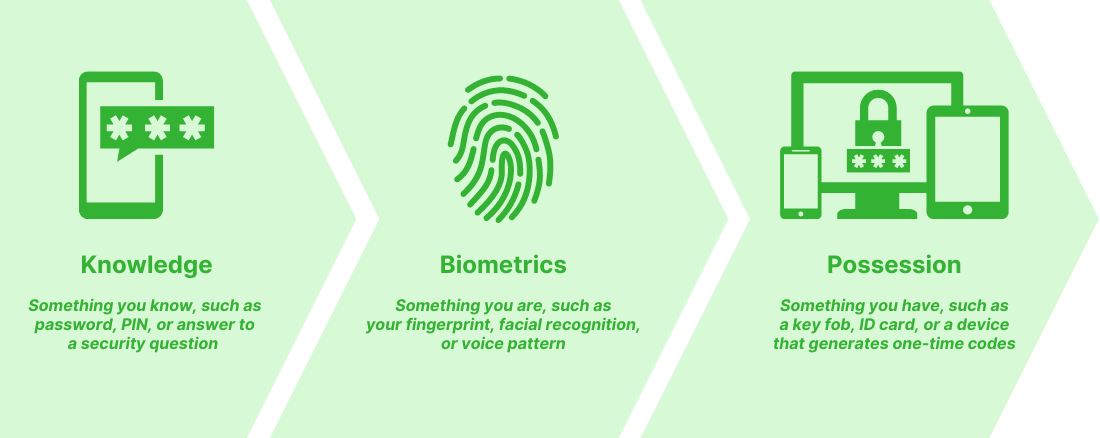
MFA can check identity in several ways, and these factors fall into three broad groups:
- Knowledge: something you know, like a password, a PIN or the answer to a security question.
- Biometrics: something you are, like a fingerprint, your face or the pattern of your voice.
- Possession: something you have, like a key fob, an ID card or a device that produces one-time codes.
MFA can also draw on:
- Location: confirming identity from an IP address or geographic location.
- Adaptive or risk-based checks: looking at user behaviour, such as when someone signs in or which device they use, to confirm identity.
Why MFA Matters
Few security measures are as simple and as powerful as MFA. Microsoft says that turning on MFA can stop 99% of attacks aimed at compromising accounts. With cybercrime on the rise, any organization holding sensitive information has a lot to gain from it.
Remote work and unprotected devices are more and more common, and both raise the odds of a cyberattack. MFA keeps employee accounts protected even in those riskier situations. For more on staying safe outside the office, read our article on cybersecurity for remote workers.
How MFA Works
MFA pairs two or more different kinds of identification. Say a user enters a username and password (something they know). They might then be asked for a fingerprint scan (something they are) or a one-time code sent to their phone (something they have).
One widely used version is two-factor authentication (2FA), which asks for exactly two proofs, such as a password plus a one-time code delivered by text or email.
What MFA Does for Your Business
MFA software brings some important advantages:
- Stronger security: keeps company, client and partner data away from people who shouldn't see it.
- Regulatory compliance: helps your organization follow identity and access management rules.
- Fewer human errors: lowers the chance of mistakes that open the door to a breach.
- Easier single sign-on (SSO): makes secure sign-in simpler for users without weakening protection.
- Support for remote work: gives solid protection to staff who connect from personal devices or public networks.
Make MFA Standard in Your Organization
Requiring MFA across your organization protects your data and builds trust with clients and partners. Don't put it off: switch on MFA now so your organization is ready and secure. Questions about securing your business communications? Talk to our team.
Frequently asked questions
What is the difference between MFA and 2FA?
Two-factor authentication (2FA) is a common form of MFA that uses exactly two forms of verification, such as a password and a one-time code. MFA requires at least two and can use more.
What are the three types of authentication factors?
Knowledge (something you know, like a password or PIN), biometrics (something you are, like a fingerprint) and possession (something you have, like a key fob or code-generating device).